ESP32 Circuit Schematic
Introduction
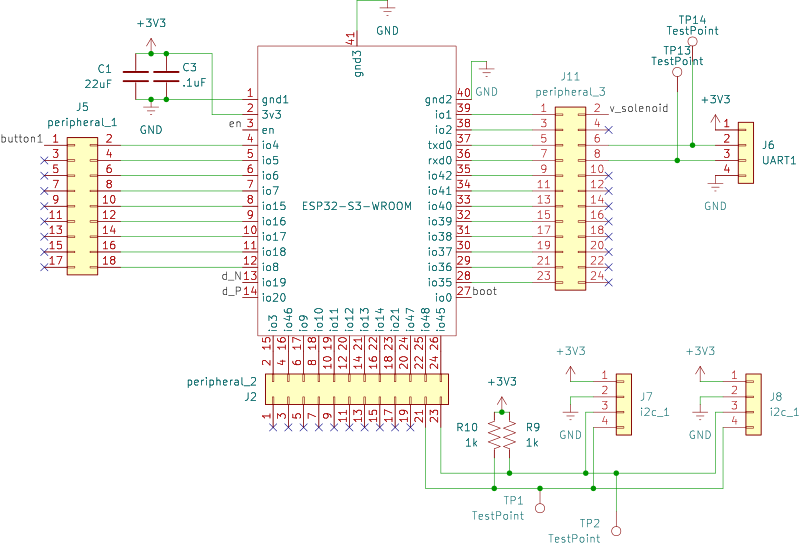
The ESP32 is the heart of our board. The purpose of this design is to expose as much of that functionality as possible in the current iteration while providing access to all the pins in case we want to expand.
Part Selection
I selected the ESP32-S3 family for a few reasons. First, as one of the more modern ESP32 variants, it is a bit more capable and future-proof. Second, the S3 is one of the first ESP32 variants that includes an on-board USB/UART interface, eliminating the need for the traditional CP210X USB <--> UART chip (and all its peripherals). This simplifies my part count and reduces my chances for failure.
I have selected the variant with the built in antenna, in the largest package (for ease of soldering), and with 4Mb flash memory
ESP32 Technical reference material
- ESP32-S3-WROOM Datasheet: This is the datasheet for the WROOM module, which is the most specific to the part. It includes pinout and package information specific to the part I selected, and refers you to the other two documents when more detail is necessary.
- ESP32-S3 Datasheet: This is general to the whole ESP32-S3 family, and includes more information about pins, operational modes, and information that applies to the whole S3 family.
- Technical Reference Manual: This gets into the nitty gritty about specific onboard peripherals, their functions, and the registers that control them. Avoid at all costs :)
Design Considerations
Powerup timing
The bootup timing sequence in section 4 of the ESP32-S3-WROOM datasheet describes the power up sequence, with some key timings:

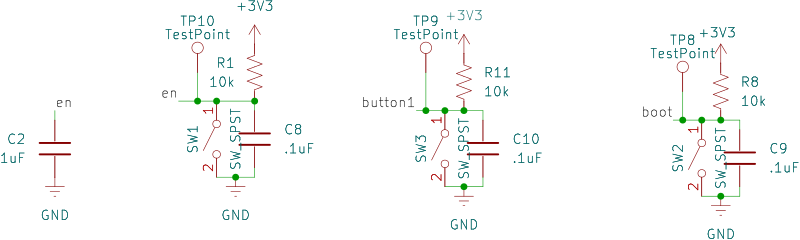
Essentially, we need to provide a ramping voltage on EN so that the pin stays low for at least 50 $\mu$s after power is applied to the power rails. An example circuit is provided in figure 9-1 of the ESP32-S3-WROOM Datasheet (page 41, "peripheral schematics") that provides an example circuit. Pay attention to the relationship between C1 and C3 vs R1 and C2. As the power ramps up at 3V3, R1 and C2 serve to further slow down that ramp-up to EN, acting like a low pass filter.
Recommended values for R1 and C2 are 1k$\Omega$ and 1uF, respectively, which I honored in my initial design, although these values should be adjusted to ensure the 50 $\mu$s timing for the final board.
Second, note the pushbutton implemented at EN in the with SW1, C8, and R7, in the same example circuit. This circuit permits the user to manually reset the board, a feature I will implement. Using this configuration, the switch will bring the voltage at EN low quickly, and then ramp up slowly, according to C8, R1, and C2 values (C8 may be redundant due to the larger C2 value, but I kept it in)

Boot Modes
An explanation about startup modes is supplied in the ESP32-S3 Datasheet (chapter 3 and section 3.1, pages 32-33). In my design we want to be able to support "SPI Boot Mode", where we load code saved in SPI flash, and "Joint Download Boot", where we can download code to flash via USB(see 4.2.1.8, "USB Serial/JTAG Controller") or UART. I will use a pushbutton at IO0 of the ESP32 to hold the voltage low in order to enter Joint Download Mode (note IO46 is not provided in the pins of the WROOM module)
Pin Assignments
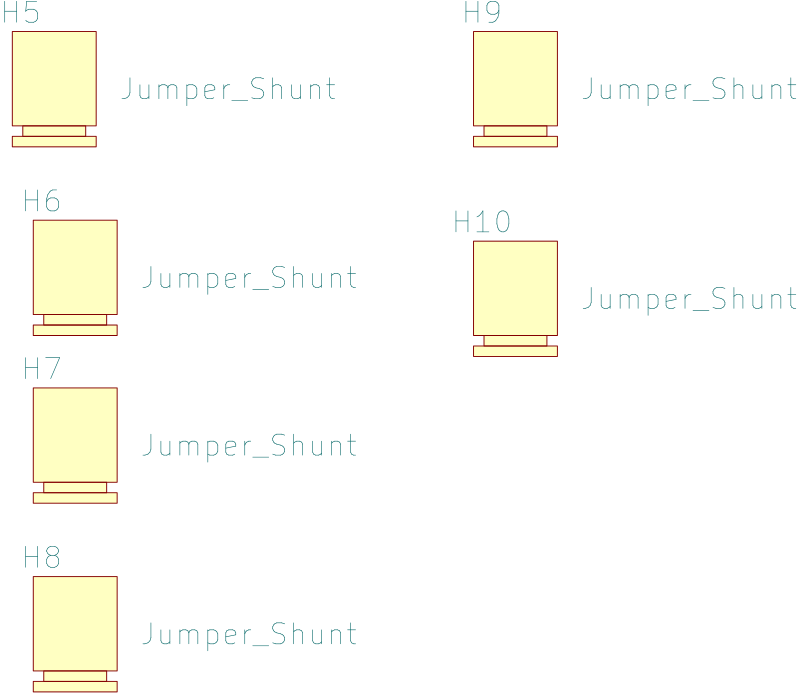
The ESP32 drives the design, but at this point I want to prepare it for future expansion, remapping pins, debuggability, and overall flexibility. Therefore, I have wrapped three male 2xN headers around the ESP32 so that I can reconfigure it almost like an old telephone operator would patch together circuits, only I will use jumpers.
The advantage of this approach for a dev board is that I can physically disconnect parts of the circuit from each other in order to better debug them prior to connecting up the full system.
It should be noted that in future board designs I will have to pay closer attention to section 2.3.4 of the ESP32-S3 Datasheet, to stay away from special-use pins
Peripheral Hardware
USB Receptacle
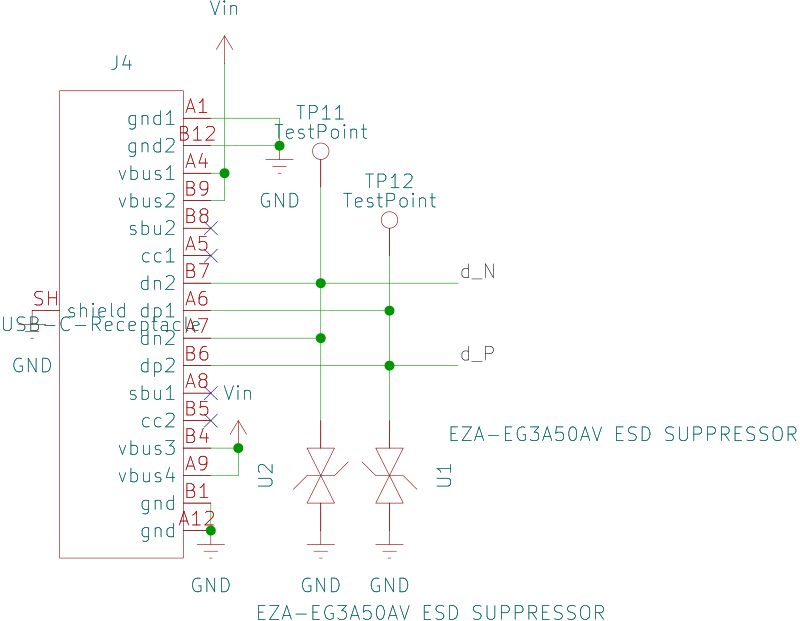
Given the number of functions that USB type C receptacles can now handle, it's hard to know which receptacle to select.
Most importantly to me, especially on the development side of things, is that I need a USB receptacle that is easy to solder. Thus I'm typically looking for pins that are accessible from the side or through hole pins.
From having worked with various USB receptacles in the past, I have learned that these devices need to be very securely mounted to the board, as they will get a lot of daily wear and tear from unplugging and plugging the cable. High on my list of considerations is that the receptacle has mount holes that can be soldered securely to the board. Vertical receptacles often break more quickly since their moment arm with respect to their mounting style will promote higher torques.
I2C Headers
Because this is a development board, I want to provide access to various kinds of IO, which may or may not be included initially on this first draft. Thus I left two spots for I squared C connections to be made. since I squared C permits multiple peers on the same network, my design permits two devices with different addresses to be plugged in and accessed
Even if it's not a standard, it does seem that many of the off-the-shelf devices that you find on SparkFun, Adafruit, or Amazon typically provide power, ground, SCL, and SDA pins in a consistent order, meaning that I can plug any number of devices in (that share that same sequence of pins) or use jumper wires (if I need to rearrange them).
Because many off-the-shelf daughterboards include their own I2C pull-up resistors, I opted to select through-hole resistors for R9 and R10. I can change the resistance value quite easily from an off-the-shelf resistor kit or leave them off entirely if the accompanying daughter boards include them. Some initial boards that I plan to use include an I2C OLED, a BNO055/085 IMU, and a VL53L0xtime of flight rangefinder.
Also included in my design is a discrete header pin for connection to the UART0 subsystem. This will allow me to connect a off-the-shelf USB to serial device if I would like to separately program the ESP32. (by default, UART0 is assigned to programming code to flash memory)
Schematic
Part Selection
| Reference | Qty | Value | URL | search_url | Price 1 |
|---|---|---|---|---|---|
| C1 | 1 | 22uF | link | 0.14 | |
| C2 | 1 | 1uF | link | 0.1 | |
| C3,C8,C9,C10 | 4 | .1uF | link | link | 0.1 |
| H5,H6,H7,H8,H9,H10 | 6 | Jumper_Shunt | link | link | 0.1 |
| J1 | 1 | Conn_01x02_Pin | |||
| J2 | 1 | peripheral_2 | link | 0.57 | |
| J4 | 1 | USB-C-Receptacle | link | link | 0.37 |
| J5 | 1 | peripheral_1 | link | ||
| J6 | 1 | UART1 | |||
| J7,J8 | 2 | i2c_1 | |||
| J9 | 1 | Conn_01x02_Socket | |||
| J11 | 1 | peripheral_3 | link | ||
| R1,R8,R11 | 3 | 10k | link | link | 0.1 |
| R9,R10 | 2 | 1k | |||
| SW1,SW2,SW3 | 3 | SW_SPST | link | link | 0.16 |
| TPX | 18 | TestPoint | link | link | 0.27 |
| U1,U2 | 2 | EZA-EG3A50AV ESD SUPPRESSOR | link | 0.3 | |
| U4 | 1 | ESP32-S3-WROOM | link | 5.21 |