Power Supply Design
This tutorial will cover the design process for a switching power supply.
What is a switching power supply?
There are two main types of power supplies under consideration for a design like this: a linear power supply or a switching power supply.
A linear power supply has at the heart of it a linear voltage regulator, which is a transistor-based technology that converts a higher input voltage to a lower but more stable output voltage. How does it do that? In layman's terms, it burns off the excess voltage by converting it into heat. A transistor that is semi-active can act like a resistor, and this kind of voltage regulator is very good at converting that current flowing over its resistive components into heat without being damaged. Can you think of some of the potential downsides of this approach, and why it might not be appropriate in some cases?
A switching power supply on the other hand works a bit differently. The element at the heart of a switching power supply is called a switching voltage regulator. it behaves by turning on or off its output at a very high rate depending on if the output voltage is below or above the desired voltage.
To compare the two scenarios, Imagine filling a leaky tub with a fire hose. If your goal is to keep the tub filled, you have two options. A linear voltage regulator keeps the tub filled by letting it overflow. You can keep dumping water into the tub to make sure that no matter how much is draining out, it always stays filled. But the downside is that you lose a lot of water over the edge
The switching power supply analogy is that you use the valve on the hose to intermittently start and stop the hose as needed. You have to turn on the fire hose only as the tub drains. Turn the fire hose on all the way and it overflows. Keep it off and it drops below the desired level.
If you think of the water level in the analogy as the voltage, and any water over the side as wasted heat energy, can you see the advantage of one over the other?
So which one should you pick? The upside of a circuit built around a linear voltage regulator is that it can be relatively simple. The simplest typical circuit design often involves just three components: an input capacitor, the voltage regulator, and an output capacitor. A switching power supply usually requires a few more components including an inductor. which has to be sized appropriately.
A switching power supply will inherently be more efficient. And because the switching power supply does not intentionally overflow the tub, it's a lot more efficient...It also takes precise timing and a lot more attention. When we get into component selection, you'll see that a switching power supply requires more components, with more precise sizing requirements based on your use-case.
So today we're going to design a switching power supply and walk you through the process of selecting the components and laying them out in a schematic.
Essential Design Variables
Let's start our process by deciding on some key design variables. In a full design process, these might be decided from user needs or driven by other parts of your design.
Let's list out the design variables that we want to make a decision on up front.
| Variable | Value | Description |
|---|---|---|
| $V_{in(max)}$ | 12V | The maximum input voltage expected at the power supply |
| $V_{out}$ | 3.3V | The output of the power supply |
| $I_{load(max)}$ | 1A | The maximum expected current draw on the circuit |
Initial Part Selection
Selecting all the parts for your circuit is relatively iterative because the first thing you need to decide upon is which switching regulator you're going to use. So what switching voltage regulators fit the bill? Here is the search link that I used on DigiKey:
Note that I used the following search parameters:
- Output Type: Fixed
- Number of Outputs: 1
- Function: Step-down
- Current-Output: I selected all regulators over 1A
- Voltage-Output(Min/Fixex): 3.32V, 3.3V
- Stocking Options: In Stock, Normally Stocking
To sort my options. I arranged by price, and then supplied a value of "1" in the price column in the the "price by quantity" field. This has the effect of ensuring that I can buy small numbers of components rather than find parts that can only be purchased in large volumes.
Another handy option to reduce delays is to select the "exclude marketplace product" from the common attributes section of the search. Though you can find some good deals in the marketplace, these often come with minimum purchase requirements or extra delays or shipping costs. Let's use Digi-Key exclusively to ensure we get parts in a single shipment and on time.
Looking at the list that results from this search, we see that Many of the cheapest parts are surface mount. To improve our prototyping abilities, let's further filter by selecting only through whole parts for this design.
The part that comes up at the top of the list is the LM2575 and its variants. This is a well-known part that is produced by a number of different manufacturers. It's a good choice because it's so widely available across manufacturers that you can base your design off of it and be relatively sure that you can swap parts out if one becomes unavailable.
| Item | Value |
|---|---|
| Selected Part | LM2575-3.3WT |
| Price per Unit | $1.72 |
| Datasheet | LM2575-datasheet |
Datasheet deep dive
Now that we've picked our part, let's take a look at what's going on under the hood. This is when the ubiquity of the LM2575 comes in handy. I found that the microchip variant that we've selected has a pretty poor datasheet without any design considerations included. The test circuit that they suggest does not take advantage of a switching regulator's best design components.
So let's instead take a look at OnSemi's equivalent.
What are some things that pop out of this data sheet?
- Page 1:
- Check out the different variants. They have both fixed and adjustable regulators based on the same basic architecture. If I ever wanted to adjust my design for a different output, this general part would be a good starting point for any.
- Frequency. This device has a fixed-frequency internal oscillator operating at 52 kHz.
- 1 amp output current.
- sample application circuit. Even though I will adjust this design based on my own specs, this is a really good starting point for how our circuit will look.
- page 3
- We will need to refer back to this page for the pinouts if we need to create this symbol for our schematic.
- Another thing to note is that the TO-220 package and the TO-263 package both have heatsink tabs included on their package and these are connected to ground.
- page four.
- absolute maximum ratings. We need to check the maximum supply voltage. For the LM2575 it's 45 volts which is far above our 12 volt maximum.
- The on/off pin input voltage should never be lower than 0.3 volts and never larger than the VIN voltage.
- One final maximum rating we should pay attention to is the lead temperature, which should never be higher than 260 degrees Celsius for longer than 10 seconds.
- The rest of page 4 displays its operating characteristics, which are useful for understanding how this component will work with other components.
- Page 9.
- Even though these are figures, they include some really important characteristics. The dropout voltage is one of those. Dropout voltage is the difference between the input and the output voltage required for operation. at 1 amp and 25 degrees Celsius,The voltage differential is 1.25 volts. This means that you need approximately 4.5V for the device to work at all.
Component Selection
This section is based heavily on the design guidelines found on page 9 of Onsemi's Data Sheet.
- Step one of their design process was already described above. We have collected our important design variables, the $V_{in_{max}}$, $V_{out}$, and $I_{load_{max}}$
- This step is also already completed since we selected the LM2575.
-
input capacitor selection
- The key things to keep in mind here is the "low ESR" requirement. The datasheet recommends an aluminum electrolytic or tantalum electrolytic bypass capacitor.
-
I searched on Digikey for a tantalum polymer capacitor. . These devices have an extremely low ESR. Here is my search query. In terms of key parameters, I searched for:
- Something in the range of 100 uF. Bigger is not always better, but It was in the range of the 47 uF suggested in the datasheet, but bigger.
- footprint. I also wanted to make sure that the footprint of the selected part was easy to place on the board since I'll be hand soldering it, but smaller than a typical electrolytic capacitor.
- I kept an eye on what the ESR rating was. tantalum polymer capacitors are going to be quite a bit lower than aluminum electrolytic, and most of these were.
- This is the part that I selected.
-
From page 15 of the external components section of the LM2575 datasheet, we see that RMS current rating for CN is important. Looking deep into the datasheet of the selected capacitor, I see the maximum allowable RMS current is 1,633 mA. Checking this rating against the expected RMS current, I calculate from the equations on page 15 of the LM2575 datasheet:
$$I_{rms} > 1.2 * d * I_{load}$$ $$d=V_{out}/V_{in} = 3.3/12 = .275$$
Plugging all the values into the RMS equation we see:
$$I_{rms} > 1.2 * .275 * 1 = .33A$$
This means that our selected part is sufficient. 1. Catch diode selection 1. From the design procedure we see that the diode current rating must be at least 1.2 times greater than the maximum load current, or 1.2A. 1. Furthermore, the reverse voltage of the diode should be at least 1.25 * the $V_{in(max)}$, or >15V 1. This was the search I used. I searched for "schottkey single diodes" 1. Key Search parameters: * Technology: Schottky * Current-average Rectified: 1.4 A and above * Voltage - DC Reverse Max: Min 16V * Voltage -Forward Max: Min: .33V, max .5V 1. This was the part I selected. It was the cheapest part you could buy as a single unit, and similar specs to the 1N5820 1. Inductor Selection. 1. For a 3.3 volt fixed output, We look at figure 17 on page 12. The x-axis is maximum load current. Since our maximum load current is 1 amp, we go up in y by traveling on the far right of the graph. Matching up the Y value to 12 volts, we see that the suggested inductor is in the "L220" range, corresponding to a 220 mH inductor. 1. Using the equation
$$I_{p(max)} = I_{load(max)}+\frac{(V_{in}-V_{out})t_{on}}{2L}$$
$$T = \frac{1}{f}=\frac{1}{52000} = 19.2 \mu s$$
$$t_{on} = d*T =.275(1.92 * 10^{-5}) = 5.29 \mu s$$
$$I_{p(max)}=1+\frac{8.7 * 5.29 * 10^{-6}}{2 * 220 * 10^{-6}}=1.105A$$
-
Let's look on Digikey for a 220 millihenry inductor. Here is my query. Key Search Parameters
- Inductance: 220 uH
- Current Rating: min: 1.2A
- Stocking Options: In Stock
- Exclude: Marketplace
- I selected this part because it had a semi-standard surface mount footprint and was near the top of the list in terms of price.
- Output Capacitor
- Using the design procedure on page 10, it basically recommends any capacitance between 100uF and 470uF. I selected a 470uF capacitor.
- The voltage rating should be at least 1.5x the output voltage, or >5V.
- However, note on page 15 the bolded heading that says "The Output Capacitor Requires an ESR Value That Has an Upper and Lower Limit". That informed my capacitor selection.
- Here is my digikey search query. Again I went with a tantalum polymer capacitor. Key specs:
- ESR: between 50 mOhm and 150 mOhm
- Capacitance: 470 uF
- Stocking Options: In Stock
- I selected this part. It has a slightly larger surface mount footprint that may need to be hand-designed in KiCAD, but otherwise was the cheapest part in the list.
Schematic
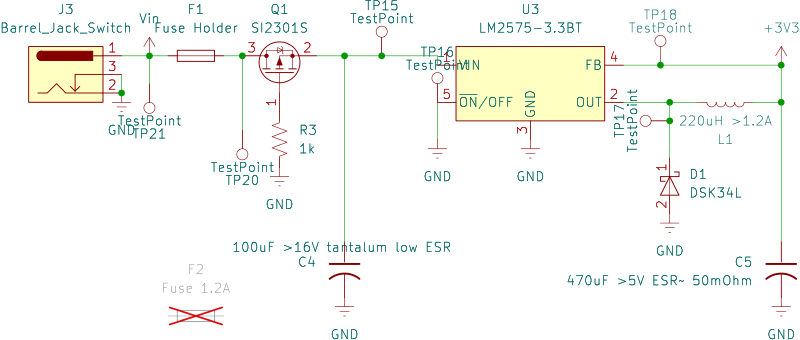
The schematic above reflects the design process outlined in the previous section, plus a couple other components. Let's go through those.
- Barrel jack connector: We want a way to power this board, and a barrel jack connector is both relatively standard and easy to implement. I selected a part that I've used before that has three prongs that are also compatible with a breadboard for easy reuse in other contexts.
- Fuse and fuse holder: We need to add a fuse in series with where the voltage comes in. In terms of KiCad, the way to add both components in a way that's consistent with the PCB design is to add a component into the schematic representing the fuse holder, and to add a part representing the fuse that does not go in the board design. I selected a 5x20 mm holder and fuse, for ease of access and replaceability.
- P-Channel MOSFET: This device prevents a reverse voltage going into the circuit, without the voltage drop that usually accompanies a diode-based solution. A 1 kOhm resistor pulls it low to activate it.
- Test points: These parts are added to the schematic in order to highlight that we need to add at the very least a hole or via for or pad for testing voltages. The footprint that accompanies these test points can be either in the form of a via, a copper pad, or a discrete part that gets soldered in.
Placing parts
Many of the parts selected above are already listed in the parts database included with KiCad. Even with similar or same part numbers, care must still be taken when using a pre-designed part from any library. The footprint selected might be different. The pin numbering might be different. The internal references to the datasheet and manufacturer might also be different. of that part and add it to your local parts library so that you can make modifications to it.
Final Parts List
| Reference | Qty | Value | Part Search | Selected Part |
|---|---|---|---|---|
| C4 | 1 | 100uF >16V tantalum low ESR | link | link |
| C5 | 1 | 470uF >5V ESR~ 50mOhm | link | link |
| D1 | 1 | DSK34L | link | link |
| F1 | 1 | Fuse Holder | link | link |
| F2 | 1 | Fuse 1.2A | link | link |
| J3 | 1 | Barrel_Jack_Switch | link | |
| L1 | 1 | 220uH >1.2A | link | link |
| Q1 | 1 | SI2301S | link | link |
| R3 | 1 | 1k | link | link |
| TPX | 6 | TestPoint | link | link |
| U3 | 1 | LM2575-3.3BT | link | link |