3D Printing Workshop
I gave a workshop at the Petaluma Library recently, and here are my notes
About Myself
- BS, MS, and PhD in Mechanical Engineering
- Professor of Engineering at ASU for 10 Years
- Moved to Petaluma in January, starting a consulting/mentoring/education business
Workshop Overview
Agenda
About Myself- Overview of 3D Printing
- Overview of Computer Aided Design (CAD)
- Practical Example of CAD Usage
- Slicing and Printing Example
Point of this Workshop
I see many people who have access to a 3D printer
Want to:
- Make their own parts
- Enable a second hobby
- Make things for others
- $$ Replacement Parts
Don't:
- Customize Print Settings
- Optimize Designs for Printing
- Design Parts --> Thingiverse
Library Specific
This tutorial is
- Targeted for library printer
- Discusses library Processes
Some things may be different for your printer, but most of this will apply to you.
Items Needed
- Laptop
- Several Programs
- CAD -- OnShape (web-based), OpenSCAD, FreeCAD, Solidworks, Autodesk Fusion
- Slicer -- PrusaSlicer, Cura, Slic3r, Bambu Studio, ...
- Access to 3D Printer
- Calipers (or Ruler)
- Library Wifi
Detailed Instructions
Web-based version of this presentation can be found here:

3D printing
Quick Show of Hands
Raise your hand if:
- You have a 3D Printer at Home
- You have used the Library's 3D Printer
- You have ever used a 3D Printer
- You hope to do one of the above
What is a 3d printer?
Library's 3D Printer
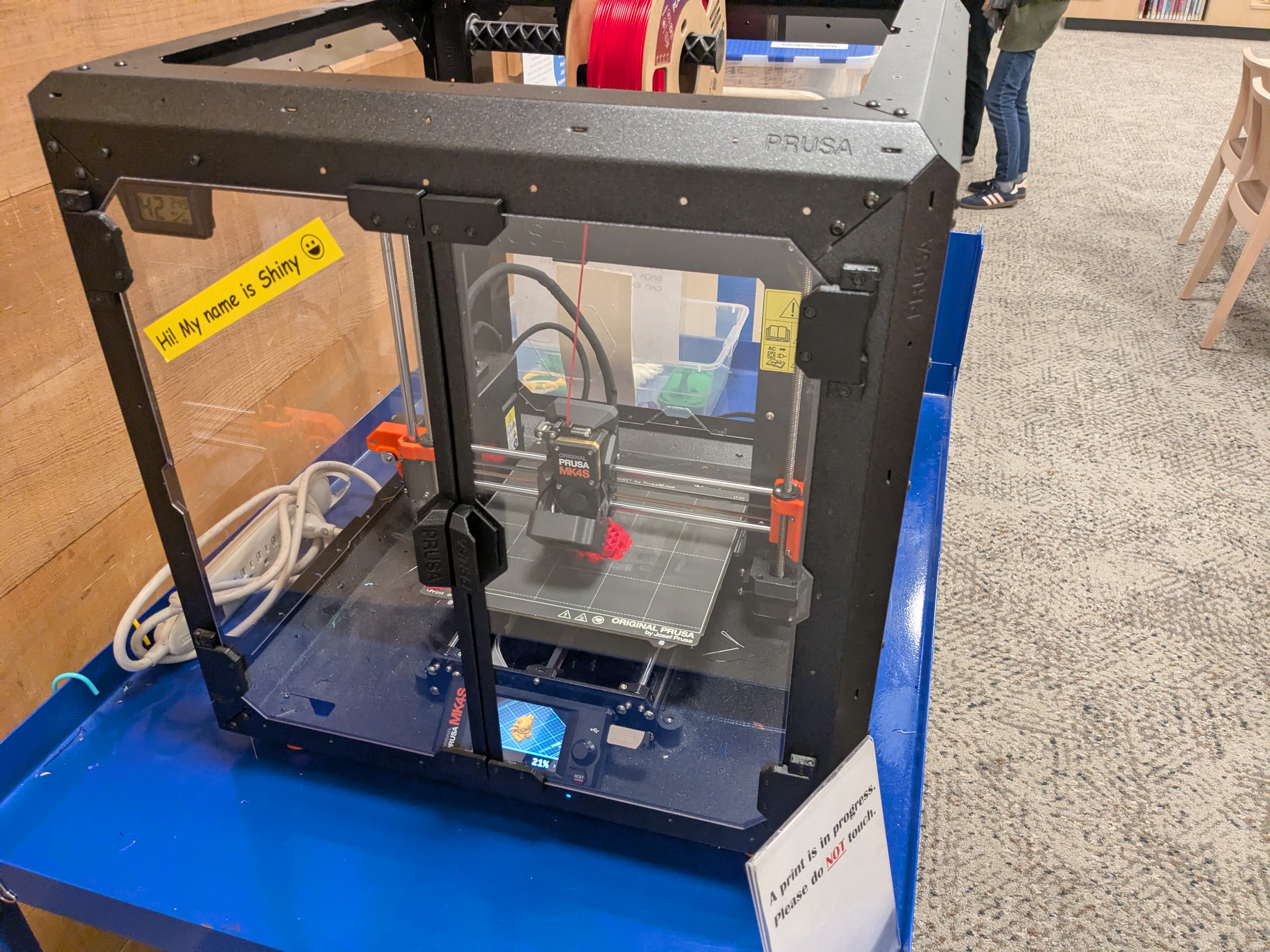
Specs

- 250x210x220 mm print
- Filament diameter: 1.75mm
- Layer height 0.05-0.30 mm
- Supported materials PLA, PETG, Flex, PVA, PC, PP, CPE, PVB and when using the Original Prusa Enclosure with filtration add-on ABS, ASA, HIPS, PA
Categories of 3D Printing
3D printing is an example of additive manufacturing.
- Powder Bed Fusion
- Laser Sintering
- Resin Bed: Stereolithography, DLP, etc
- FDM: Fused Deposition Manufacturing
- Printing / Jetting / Polyjet
3D Printer Hardware
Print head
Time Lapse
Materials
- Common filaments: PLA, ABS, PETG
- High-end printers support
- Flexible materials (TPU)
- Fiber reinforced
- CF thread.
- Material properties (strength, flexibility, temperature resistance)
- Trade-offs and selection criteria
- LIBRARY-SPECIFIC: What's available?
PLA is cheap, easy to work with, reduces wear and tear and is compostable
Note: Not Food Safe
Digital Workflow
- 3D model sources (download vs. design)
- File formats (STL, 3MF recommended for library)
- Slicing process using software like Cura or PrusaSlicer
- Generating G-code and what it represents
Print Setup and Operation
- Bed leveling and calibration
- Loading filament
- Starting and monitoring a print
- Basic parameter adjustments (layer height, infill, temperature, speed)
Design for 3D Printing
- Key constraints: overhangs, supports, tolerances, anisotropy
- Orientation and its impact on strength and surface quality
- Common design mistakes and how to avoid them
Geometry Constraints
- Overhangs: unsupported material fails beyond a critical angle (~45° heuristic)
- Bridging: limited span where material can stretch before sagging
- Minimum feature size: tied to nozzle diameter and layer height
Overhang
Bridge
How to deal with Overhangs / Bridges
- Orient in your slicer
- Use Dry / High Quality Material
- Adjust temp / cooling (expert)
- Use Supports
Support
Orientation as a Design Variable
- Strength aligns with filament direction
- Surface quality varies by face orientation
- Trade-off: strength vs. support material vs. print time
Structural Considerations
Structural Considerations
- Anisotropy: weakest axis is typically Z (layer stacking direction)
- Stress alignment: orient parts so loads run along continuous extrusions
- Infill vs. shell: strength of a part is often dominated by outer walls, not internal fill
Infill Patterns
Infill Percentage
Tolerancing and Fit
- Clearance is required due to extrusion width and variability
- Holes print undersized; external features print oversized
- Design intent must account for manufacturing process
Post-Processing
- Removing supports
- Drilling / Reaming
- Tapping / Adding inserts
- Sanding, finishing, and assembly
- Optional treatments (painting, acetone smoothing for ABS)
Troubleshooting
- Common print failures (warping, stringing, clogging)
- Diagnostic approach: isolating variables
- Preventative practices
Deal with Failures
- Nothing too long and skinny (in any orientation)
- Check temperature / cooling
- Print speeds
- Use high-quality material
- Dry your filament
- Check/Clean/Replace your print head
- Check/Clean the bed
Dealing with Failures
- https://www.additive-x.com/blog/how-to-overcome-the-most-common-3d-printing-failures/
- https://www.makeuseof.com/3d-print-failures-common-causes-and-solutions/
Safety and Best Practices
- Temperature hazards (hotend, bed)
- Ventilation considerations (especially with ABS/resins)
- Watch your Part -- easy to waste material
- Clean your 3d Printer
Split the Class
In this phase we split into two 15-minute sessions, one here, one with the librarians.
CAD
What is CAD?
Computer
Aided
Design
CAD Tools
- Autodesk Fusion
- Solidworks
- Onshape
- FreeCAD
- OpenSCAD
- ...
Let's Use Onshape

Sketch
Dimensioning
Extruding
Other advanced things
- Fillet / Chamfer
- Loft
- Revolve
Export
- STL, 3MF (for library)
- Just use defaults
- This goes to Slicing
Slicing Exercise
We should all be back in the same room
What is a slicer
- 3D Shape --> machine instructions
- CNC (computer numerical control)
Slicers
- Prusa Slicer
- Cura
- Slic3r
Import Part
Orienting Part
Machine Parameters
- Print Height
- Temperature
- Infill
- Infill Pattern
- Support
- Support Pattern
Show Output
Show Estimates
Show Impact of Changing Variables
To Find me